Building the Future: Why Developers Love Working with Headless CMS for eCommerce Platforms

Mayank Patel
Nov 30, 2023
6 min read
Last updated Jan 9, 2024
Technology has enabled developers to build complex software products in effective ways. User experience is the central goal of any application. And why not? They are the ones going to use the services.
Taking the context of online shopping, we all love to shop online. It's so easy to order anything online from the comfort of our homes with just a few clicks.
It’s a hit of dopamine for our brains every time we click that “Buy Now” button on eCommerce applications like Amazon, Flipkart, and similar other platforms.
Sure, the user experience is great.
Looking at it from a developer’s perspective allows us to see the engineering that goes into making such platforms.
The architecture of an eCommerce application serves as the backbone of the entire platform. Headless CMS is one of the approaches to architect the same.
The core principle of Headless CMS allows developers to implement functionalities with flexibility. Making it a bit less abstract, Headless CMS allows for separating concerns for the backend or the servers and the frontend.
Everyone talks about the user experience or the customer experience. Luckily for developers, headless CMS also takes care of the developer experience along with the users.
As a leading software development company, Linearloop advocates for the user as well as the developer experience. We know the complexities and challenges in developing great solutions and products. eCommerce is a very lucrative and effective way to sell online.
Using a headless CMS is one of the best ways to get up and running without sacrificing reliability. Additionally, it adds to a better developer experience with scale.
In this post, we will walk you through a holistic overview of Headless CMS for eCommerce with the following topics.
- A General Overview of Headless CMS
- Why Developers Love Working With Headless CMS for eCommerce?
- What are the Popular Platforms for Headless CMS for eCommerce?
- Wrapping Up
- Frequently Asked Questions (FAQs)
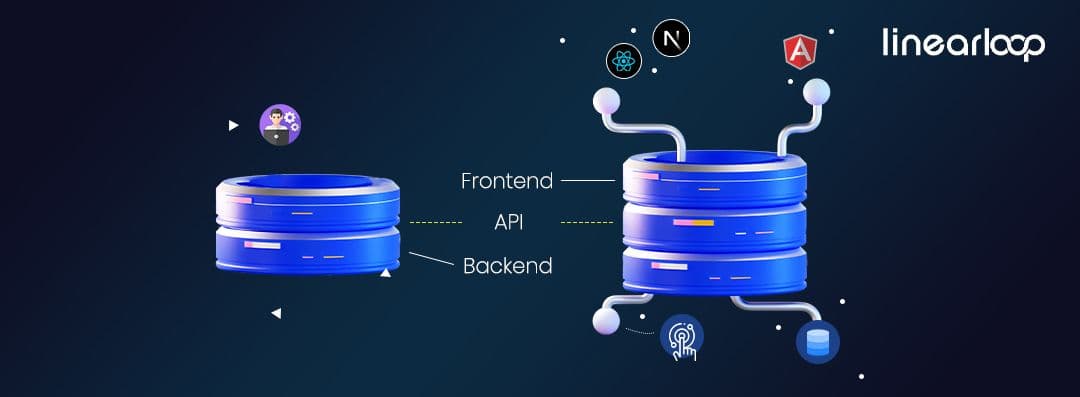
Headless CMS is exactly what it sounds like. It is a backend-only setup that uses an API-first approach. The head is the frontend part. This is where the developers can use a frontend framework of their choice.
Headless means there is no frontend to it. All the server logic is already pre-defined and available to use with a frontend of our choice.
For example, the frontend can based on React, Angular, Vue, or something else. There are no limits to it. It can be frameworks like Next.js, Nuxt.js, and similar others. Note that these are some of the most popular JavaScript libraries in the software world.
These frontend libraries (or frameworks) or “Head” get all the data through the APIs. And this pre-assembled data and logic from the backend.
Now the backend is where most of the magic happens.
The CMS or the content management system is the data store. This data store has already the schema, data models, security features, scalability features, and all the things ready to be served through the API endpoints. They usually follow the RESTful or GraphQL approach and protocols for data transfers.
This indeed does all the heavy lifting for the application. Since developers don’t have to write every piece of code for the servers, they can put all their effort into consuming the data and using it across various devices or platforms or channels taking care of the frontend part.
This approach is very effective in the eCommerce domain.
Since there are so many common workflows in eCommerce software like inventory management, product lists, categories, discounts, shipping methods, and similar things, the developer experience is just so much better.
Popular platforms that provide Headless CMS for eCommerce include Contentful, Storyblok, Sanity, and Prismic.
As per the explanation above, below is the general architecture of a Headless CMS

The gist of headless CMS has already been explained in the previous section of the post. Now go through some points that make headless CMS a go-to approach for developers:
Frontend of Choice
Since there are so many types of developers out there preferring one frontend library or framework over the other, headless CMS provides them this flexibility. They can choose frontend of their choice like React, Angular, or Vue to build the eCommerce platform the way they want.
Efficient Multi-device and Multi-platform Handling
Considering there are so many devices and ways to sell products online, developers don't have to worry too much about the server or the data part. The data is already provided through the APIs. Much of the heavy lifting is done by the servers.
This also enables them to use this data and create layouts for many different platforms and devices. For example, the same data can be used to develop a desktop app, a native mobile app, a POS (Point of Sale), or any other platform.
Pre-Built Security and Reliability
eCommerce deals with actual money. While things are sold online, there are just so many transactions happening through it. Building servers in-house for eCommerce purposes and ensuring security for them can be an issue. Risks such as cross-site scripting (XSS), SQL injections, DDoS attacks, and data breaches can put a huge dent if not properly taken care of.
Other security features like authentication methods, HTTPS, CORS policy, rate-limiting, SSL encryption protocols, and similar features can be cumbersome to implement from scratch. Since all these are pre-handled by the CMS, developers can focus on implementing frontend business logic rather than worrying about the server-side logic for handling data.
Improved Scalability Features
eCommerce focuses on selling to the masses. Scalability can be a huge factor in determining the fate of a business. Headless CMS offers just that. Since the frontend and the backend are decoupled from each other, both parts can be adjusted as per the requirements.
Developers can easily utilize the pre-built features to adjust the software according to traffic or needs. It can be scaled up or scaled down. Since most of such platforms are cloud-based, this pushes for handling high user traffic without hassles and optimized costs
Performance Benefits
Since we already have data coming through the APIs from the Headless CMS, the frontend frameworks can use many techniques like code splitting, lazy loading, and caching to make the application more performant.
Frontend frameworks like Next.js and Nuxt.js love this approach and are built on top of these features. Developers heavily rely on these features for maximum performance.
Reusability and Consistency
Headless CMS uses a decoupled approach making the data re-usable consistently across many platforms. All the data relationships are pre-defined and available through the API calls, there are no limits to how they can be utilized.
For example, the same central data repository can be used for web apps, mobile apps, or even social media eCommerce channels. All developers need to do is define relationships of content and use those in the way they want.
Higher Productivity and Tools Agonistic
The decoupling of the frontend and the backend also allows for better resource allocation as per the requirements. Managing also becomes easy with Headless CMS.
This also allows developers to use tools, languages, and frameworks of their choice. This increases the productivity of developers since there are fewer constraints or rigid requirements that can be project-specific.
Composable Tech-Stack
Headless CMS allows the mix and match of the technology and features as per the needs. Once they are selected and integrated as per the requirements, they can be customized in many ways.
Additionally, tools like analytics, dashboards, and monitoring features are also available in most modern Headless CMS. This reduces the additional overhead of implementing such tools from scratch.
Proven Track Record of Handling Enterprise Level Businesses
Headless CMSs are being used by so many tech giants. eCommerce can be very resource-intensive when it comes to operations. The technology stack is also very difficult to set up on our own since there are so many that go into putting them together.
Companies like IKEA, Nike, Puma, and many more use them for their eCommerce purposes. This also helps developers and companies rely on headless CMS for enterprise-level projects.
In this section, we will go through some of the most popular headless CMS platforms for eCommerce. It must be noted that they are highly customizable and they have many use cases.
We will also see some related companies and frameworks powered by them:
Contentful
Contentful is a very popular cloud-based Headless CMS platform. It can help you make online content management very flexible.
Some features of the Contentful Headless CMS include:
- It is very scalable and offers an infrastructure to run businesses reliably.
- It has a great documentation.
- With diverse APIs and useful SDKs for making scalable systems, it is highly customizable.
- It allows for an intuitive interface, and a secure infrastructure, and is suitable for businesses of various sizes.
- It uses an API-first approach making it very flexible for most use cases.
- It has extensible Dashboard features.
- Can be easily integrated with Slack, Jira, GitLab, Google Analytics, Bitbucket, AWS Lambda, and more.
- Some companies using Contentful Headless CMS include IKEA, Spotify, Disney+Hotstar, Electronic Arts (EA Games), BMW, and Audible.
Strapi
Strapi is another great tool for Headless CMS platforms. It is open-sourced and has excellent community support. It is very popular with technical bloggers. As of November 2023, it has around 57.4K GitHub stars.
Some features of Strapi include:
- Easy setup
- Highly customizable APIs
- Enables fast product development
- It has easy Internationalization features making it very flexible to implement localization features as well.
- It has extensible Dashboard features.
- Can be easily integrated using technologies like Python, Node.js, React, GitHub, Docker, Flutter, Ruby, Next.js, and many more.
- Some companies using Strapi Headless CMS include Discovery Channel, IBM, and Societe Generale.
Prismic
Prismic is also a popular Headless CMS platform that supports a variety of programming languages. It is also used by tech heavyweights such as Netflix and Google.
Some features of Prismic include:
- Feature-rich and simple admin panel
- API-first approach with various customization options
- Compatible with frameworks like Next.js, Nuxt.js, and SvelteKit
- Support for technologies like React.js, Vue.js, Express.js, Vanilla JS, Ruby, Java, PHP, GraphQL, and Laravel.
- Great documentation is available for it.
- Some companies using Prismic Headless CMS include Netflix, Google, Dribble, and Deliveroo.
Sanity
Sanity is another excellent choice in Headless CMS cloud platforms. It is highly customizable and is widely used by mega corporations across the globe.
Some features of Sanity include:
- Real-time collaboration capabilities.
- Features for image cropping and scaling configurations
- Widely adopted by e-commerce, marketing, media, and support companies.
- Very performant for large-scale projects with incredible API customization capabilities
- The documentation is really nice and user-friendly.
- Specifically designed for Product Owners, Developers, Digital Marketers, Content Creators, and SEO managers.
- Some companies using Sanity Headless CMS include Nike, Puma, Figma, Shopify, Netlify, and Cloudflare.
Storyblok
Storyblok is an enterprise-level headless CMS platform with immense capabilities.
Some features of Storyblok include:
- REST and GraphQL APIs for query handling.
- Easy setup options.
- Backward Compatibility while API versioning.
- Comprehensive Frontend SDKs provided for web and mobile platforms
- Reliable and secure. Compliant with industry standards.
- Used by enterprises and businesses like eCommerce, Software, Transportation, Finance, and Education.
- Support for technologies like React, Next.js, Nuxt.js, Vue.js, SvelteKit, Remix, Astro, and Gatsby.
- Language support for JavaScript, TypeScript, Python, PHP, and more..
- Some companies using Sanity Headless CMS include Tesla, Adidas, Netflix, and Renault.
In this post, we took a holistic approach to present Headless CMS for eCommerce, especially for developers. Because, Why not? Just like the user experience, developer experience is equally important.
Linearloop believes that software development is a wholesome effort. Yes, user experience has to be the core ingredient in a product. Headless CMS provides ways to not only build some very successful eCommerce products but also help developers improve productivity by providing many tools of their choice and preferences. And this indeed, is the mantra of why developers love to work with Headless CMS for eCommerce as do we.
Thanks for sticking to the end. See you again soon with more of such great content.
Happy Coding 😊!

Related Posts

Why Enterprise CMS Migrations Fail Before They Begin
According to the 2025 CloudBees DevOps Migration Index, 77% of enterprise migration projects exceeded budget by more than 10%. Only one in four organisations said their migration delivered expected value within a year.
Those numbers are not an argument against migration. They are an argument for approaching it differently.
The move toward enterprise headless CMS architecture is accelerating. Forrester's Q1 2025 Wave found enterprise buyers now split roughly evenly between headless and template-based delivery. The market is not debating whether to move. It is debating how to move without the 77% outcome.
This piece addresses that question directly.
The trigger is rarely a single failure. It is accumulated operational debt.
Marketing teams raise tickets to change a headline. Engineering backlogs fill with content requests that have nothing to do with engineering. A mobile application launches and someone discovers the CMS cannot feed it. A regional team needs its own content environment and the only answer is a separate installation with separate governance and separate costs.
At some point the cost of staying on the legacy platform exceeds the cost and disruption of leaving it. That is the inflection point, and increasingly organisations are reaching it faster than they expected. The gap between what traditional enterprise CMS platforms were designed for and what modern digital operations require has widened every year.
The structural problem is this: legacy systems couple content creation, presentation logic, and delivery into a single layer. Every new channel, every new market, every new front-end framework becomes a negotiation with that coupling. The organisation adapts to the platform instead of the platform serving the organisation.
Enterprise headless CMS decouples the content management layer from the delivery layer. The CMS stores, structures, and governs content. The front end, whether a website built in Next.js, a mobile application, a retail kiosk, or an AI assistant, retrieves that content via API and renders it in context.
The operational implication is significant. A single piece of content can be authored once and delivered simultaneously across every channel without duplication, without version drift, and without a separate team managing each touchpoint.
The tension that pure headless CMS introduced was editorial experience. Developers gained API flexibility. Marketing teams lost the ability to see what they were creating in context. Every preview required a developer. Every layout change required engineering input.
Visual headless CMS resolves this tension. It preserves the structured, API-first content model while returning a live editing interface to content teams. Editors see how the page renders before publishing. Developers retain the architectural freedom they need. This is the balance most compliance-led enterprises actually need to operate at scale, and it is the architecture that platforms like dotCMS are built around.
Also Read: Enterprise Headless CMS: What to Assess Before You Shortlist a Platform
Migration projects that struggle almost always share one characteristic: they are treated as technical projects rather than organisational ones. Platform selection matters. Implementation approach matters more. Organisational readiness determines both.
There are four points where migrations consistently break down.
Content architecture underestimated
Legacy CMS platforms store content as pages, a URL, a template, a body of HTML. Headless CMS stores content as structured objects: discrete fields, typed attributes, defined relationships. Before a single piece of content moves, it needs to be remodelled.
Most organisations discover that 30 to 40% of their existing content is redundant, outdated, or structurally inconsistent during a comprehensive audit. A site with several hundred pages often contains thousands of content fragments when examined properly. Building this rationalisation into the project plan is not pessimism. It is accuracy.
Governance undefined before go-live
In legacy CMS environments, governance is often informal, a set of conventions that evolved over years rather than a designed system. A structured enterprise headless CMS platform forces this to be explicit. Workflows, approval chains, user roles, and publishing permissions need to be architected before launch, not discovered after it.
For compliance-led enterprises in financial services, healthcare, or regulated manufacturing, this is not a configuration task. It is a content operations design exercise. Treating it as anything less is the fastest route to a post-launch governance failure.
Integration dependencies mapped late
Legacy enterprise CMS platforms accumulate integrations over time: analytics, personalisation, search, CRM, digital asset management, e-commerce. Each integration needs to be assessed against the new API-first architecture. Some connect cleanly. Some need to be rebuilt. Some need to be replaced.
Mapping these dependencies at the start of the project, not during development, prevents the scope expansion that derails timelines and inflates budgets.
Team readiness treated as an afterthought
The migration is not complete when the platform is live. It is complete when the teams using it can operate independently and confidently. Training, documentation, and a supported transition period are not optional extras in an enterprise context. They are delivery components.
Enterprise headless CMS adoption fails most visibly at this point, not because the platform is wrong but because the organisation was not prepared to use it.
Also Read: Headless vs Hybrid vs “Universal” CMS: Which Model Fits Multi-Team Delivery?
The organisations that manage CMS migrations most effectively treat them as structured transitions rather than cut-overs.
Phase the migration, do not cut over. Running the legacy platform and the new platform in parallel for a defined period, starting with lower-risk content areas and migrating progressively, reduces delivery risk and gives teams time to develop operational competency before the full switch.
Define the content model before selecting the front end. The content architecture decision shapes editorial workflows for years. Front-end framework choices are reversible in a headless architecture. Content model decisions are significantly less so.
Invest in the front-end layer. A decoupled architecture requires a capable front end. If the organisation's engineering team is not experienced with the frameworks commonly used in headless implementations, that capability either needs to be built or sourced from an implementation partner with direct experience in enterprise headless CMS delivery.
Validate governance in staging. Approval workflows, role-based permissions, and audit logging need to be tested against realistic editorial scenarios before go-live, not after the compliance team reviews the first published page.
The case for moving to an enterprise headless CMS is not made in the platform. It is made in what the platform unlocks.
Marketing teams that no longer wait on engineering publish faster, localise faster, and test faster. Engineering teams freed from content maintenance focus on product development. Governance teams operating within a structured, auditable workflow environment have cleaner records and fewer compliance incidents.
Organisations running multi-site management from a single governed environment, rather than maintaining separate CMS installations for each brand, region, or microsite, begin to see content infrastructure as a commercial asset rather than a maintenance cost.
Prominent businesses that have moved to headless architecture report 65% faster time to market for new digital channels and touchpoints. The gap between organisations that have made this shift and those still managing monolithic enterprise CMS platforms will widen as omnichannel delivery, AI content integration, and multi-region operations become baseline expectations rather than competitive advantages.
The choice of implementation partner shapes the migration outcome as much as the choice of enterprise CMS platform.
A capable partner brings three things beyond technical execution: a methodology for content architecture grounded in how the organisation actually operates, experience navigating the governance and integration questions that arise in enterprise environments, and the ability to work across the boundary between marketing and engineering without losing either team in the process.
Platform expertise is necessary. Understanding what the platform is being asked to do, and for whom, is what separates a successful enterprise headless CMS migration from one that joins the 77%.
Linearloop is a dotCMS implementation partner specialising in AI-led product engineering and digital transformation. If your organisation is evaluating a CMS migration or modernising existing content infrastructure, reach out to begin the conversation.

Mayank Patel
Jul 10, 20265 min read

Enterprise Headless CMS: What to Assess Before You Shortlist a Platform
An enterprise headless CMS separates content storage from the front end that displays it, delivering content through an API so the same content can power a website, a mobile app, or any other channel independently. Choosing the right one depends on three things: how many channels your content actually needs to reach; how much front-end engineering capacity your team can commit long-term; and how complex your governance requirements are across regions or business units.
Most vendor conversations start with a feature list. That is the wrong entry point, because features do not tell you whether your organisation can actually sustain the platform once it is live. This guide covers the evaluation framework we walk enterprise teams through before any shortlist gets built, the structural comparison between platform models, and the decision logic that follows from it.
Also Read: Why Some Lead Form Fields Kill Conversions (And Which Ones Actually Help)
An enterprise CMS is a content management system built to handle the volume, governance, security and integration complexity that a single site or small business CMS is not designed for. Multiple brands, regions, approval chains and content types are the norm, not the exception. Whether that enterprise CMS should be headless, hybrid or traditional is a separate decision, and it is the one this guide answers.
Headless CMS means separating content storage from the front end that displays it, so the same content reaches a website, an app or any other channel through an API instead of a built-in template. A traditional CMS renders the page itself. A headless CMS hands content to whatever system asks for it, and that system decides how to display it.
A hybrid CMS, where platforms like dotCMS sit, keeps that API-first content layer but adds an optional front end and visual editing tools on top so marketing teams are not left waiting on engineering for every page change.
The distinction changes who owns the decision. A traditional CMS choice is largely a marketing and content operations call. A headless CMS choice is an architecture decision with marketing consequences, and it needs both functions in the room from day one.
Also Read: B2B Marketplace Logistics Workflow (End-to-End Workflow)
If the honest answer is one website, the case for headless is weaker than any headless platform's sales page will admit. Headless earns its complexity when content genuinely needs to reach multiple surfaces.
Enterprise content rarely takes one shape. A product page, a regulatory disclosure and a campaign landing page each need different fields, relationships and governance. Evaluate a platform's content modelling against your actual content types, not the demo's blog post example.
Response times, caching behaviour and rate limits under real traffic are where headless platforms diverge most from their marketing claims. Ask for load tested numbers on content structures similar to yours, not published benchmarks on a blank content model.
This is the most common regret in headless migrations. Pure API-first platforms can leave marketing teams dependent on engineering for changes that used to take five minutes. A hybrid layer or a well-built preview and editing experience is not a nice to have at enterprise scale. It is the difference between adoption and a shelved project.
Role-based permissions, approval workflows and localisation need to be assessed against your actual organisational structure, including the parts of it that are politically inconvenient to model. A platform that assumes one content team, one brand and one approval chain will not survive contact with a matrixed enterprise.
Content rarely lives alone. If product data, digital asset management or personalisation engines are already in place, the CMS has to integrate cleanly with them, not force a rebuild of adjacent systems that already work.
Vendor lock-in in headless CMS is quieter than in traditional platforms. It shows up in proprietary query languages, custom field types with no export path, and content models that only make sense inside one vendor's schema. Ask this before signing, not during the exit.
Implementation, custom front-end development, ongoing engineering support and migration efforts usually outweigh licensing costs over three years. A cheaper licence with a heavier build is not automatically the cheaper decision. Model the fully loaded cost across a three-year horizon before comparing quotes.
Also Read: Building a B2B Marketplace: Complete Blueprint for Scale, Trust, and Liquidity
The category splits into three architectural models, not a single spectrum of "more or less headless". Understanding which model a platform belongs to tells you more than any feature checklist.
Model | Representative Platforms | Strongest For | Weakest For |
Traditional monolithic | Adobe Experience Manager (legacy mode), WordPress (default) | Single-channel sites needing fast launch and minimal engineering overhead | Multi-channel delivery, API-first integrations, scaling past one front end |
Pure headless | Contentful, Sanity | Maximum channel flexibility, engineering-led teams building custom front ends | Editorial independence, out-of-the-box governance, teams without dedicated front-end resources |
Hybrid | dotCMS, Storyblok | Balancing API-first architecture with a working front end and visual editing | Teams needing extreme customisation beyond what the hybrid layer exposes |
The comparison that matters is not which platform has more features. It is which architectural model matches your organisation's actual engineering capacity and channel ambition. A pure headless platform in the hands of a marketing-led team with no dedicated front-end engineers will underperform a hybrid platform on time to value, regardless of API quality.
Within the hybrid category, dotCMS's position is specific. Content architecture is API-first from the ground up, but the platform ships with enough front-end and visual editing capability that marketing teams retain publishing independence. That trade-off is why it tends to fit enterprise teams that want headless-grade flexibility without building and maintaining a bespoke front end and editorial layer from scratch. You can see how this plays out in practice on our dotCMS partnership page.
Rather than scoring platforms feature by feature, work through this sequence.
If no, a traditional CMS is likely the correct answer, and the rest of this framework is premature. If yes, proceed.
If yes, a pure headless platform becomes viable, and API architecture and content modelling flexibility should carry the most weight in your evaluation. If no, proceed to hybrid platforms and weight editorial independence more heavily than raw API flexibility.
If governance is simple, most hybrid and headless platforms will satisfy it. If governance is complex, this becomes a disqualifying filter before cost or features are even discussed. Request a governance model walkthrough against your actual org chart before any commercial conversation.
Heavy integration load favours platforms with mature, documented APIs and existing connectors to your specific stack over platforms with broader but shallower integration claims.
Before signing, confirm content export format, whether custom field types are portable, and what a migration off the platform would realistically require. This is the question every vendor conversation skips and the one every failed migration wishes had been asked earlier.
The trade-off underneath all five steps is the same one: flexibility against build effort. A pure headless platform maximises flexibility and asks the most of your engineering team. A traditional platform minimises build effort and caps your channel ceiling. A hybrid platform trades a slice of flexibility for a working editorial layer, which is usually the correct trade for enterprise teams that need to move on content without a permanent squad dedicated to CMS infrastructure.
Also Read: How B2B Marketplaces Can Attract, Qualify, and Convert High-Value Buyers
Most enterprise buyers researching this topic are not starting from zero. They are running an existing CMS and deciding whether, and how, to move. The migration follows a predictable lifecycle, and where it breaks down is consistent across projects.
Catalogue existing content types, volume, and every system currently integrated with the CMS, including the undocumented ones. Most timelines go wrong here, because the audit is treated as a formality rather than the foundation for everything after it.
Rebuild the content architecture for the target platform before touching migration tooling. A content model copied directly from the old system replicates its constraints rather than solving them.
Migrate in stages, keeping the existing front end live wherever possible while the content layer is rebuilt underneath it. A full rebuild that goes live in one cutover carries more risk than the timeline pressure to do it that way usually accounts for.
Train content teams on the new publishing workflow before decommissioning the old system, not after. This is the stage most technical migration plans underwrite, and the one that determines whether the new platform gets adopted or quietly worked around.
A phased migration that keeps a working front end in place while the content architecture is rebuilt underneath it is, in most enterprise contexts, faster to production and materially lower risk than a full rebuild attempted in one pass.
This is the same framework we use as a dotCMS implementation partner when a client is deciding between a full headless rebuild and a phased migration that preserves a working front end while the content architecture is rebuilt underneath it. The right answer has depended less on the platform's feature list and more on how much appetite the organisation has for owning a custom front end and how urgently new channels need to ship.
The teams that get the most value from a headless or hybrid migration are the ones that work through the eight questions and the decision tree honestly before they see a single demo, because a demo will always look capable. The gap between a demo and a production system at enterprise scale is exactly where these questions live.
If your team is weighing a headless or hybrid CMS migration and the framework above raises more uncertainty than clarity, that is normal at this stage. Our team can walk through your specific content architecture and integration landscape on a call and help you work out where you actually sit on the flexibility versus build effort trade-off before you shortlist vendors.
Mayank Patel
Jul 6, 20265 min read