How to Optimise Demo Request Flows Without Disrupting Sales Infrastructure

Mayur Patel
Mar 9, 2026
6 min read
Last updated Mar 11, 2026
Experimenting with demo request flows is risky for most B2B teams. A small change to a form can break lead routing, override territory rules, double-book SDR calendars, or corrupt CRM records. Since demo requests trigger multiple operational systems at once, many teams avoid testing entirely. This results in high-intent conversion points remaining untouched, even when conversion rates could clearly improve.
Yet demo request forms sit at the most valuable moment in the funnel, when a visitor is ready to talk to sales. Improving this step can directly increase the qualified pipeline. The challenge is running experiments without disrupting routing logic, territory ownership, or calendar availability. This blog explains how teams can test demo request flows safely while keeping their sales infrastructure intact.
Read more: Personalization vs Borad UX Changes in Conversion Rate Optimization Services
Demo request flows sit directly on top of sales infrastructure. The moment a visitor submits a demo request, multiple operational systems activate simultaneously. Because these systems depend on specific fields and routing logic, even small changes to the form can break downstream processes.
- CRM record creation: Demo submissions typically create new lead or contact records in the CRM. These records feed sales pipelines, attribution models, and reporting dashboards. If form fields change or fail to map correctly, CRM records can be incomplete, duplicated, or incorrectly classified.
- Lead routing rules: Routing engines rely on structured data such as company size, geography, or industry to determine ownership. Experiments that remove or alter these inputs can disrupt assignment logic, causing leads to bypass routing rules or end up in incorrect queues.
- Territory ownership logic: Enterprise sales teams operate on strict territory structures. Demo requests are often routed based on region, account ownership, or vertical segmentation. Changes to qualification fields can override these rules, sending prospects to the wrong sales representatives.
- Calendar scheduling systems: Many demo flows connect directly to scheduling tools that surface SDR or AE calendars. If routing fails or incorrect ownership is assigned, prospects may see unavailable calendars, book incorrect representatives, or fail to schedule meetings entirely.
- SDR assignment workflows: Demo requests often trigger follow-up workflows for SDRs. This includes alerts, task creation, and outreach sequences. Broken routing or incomplete qualification data can disrupt these workflows, leading to delayed responses or missed opportunities.
- Pipeline tracking and attribution: Demo requests are key pipeline creation events. Sales and marketing teams track these conversions to measure campaign performance and revenue impact. If experiments interfere with form data or CRM mapping, pipeline attribution becomes unreliable.
Read more: Modern AI Data Stack Architecture Explained for Enterprises
Experimenting with demo request flows can easily disrupt sales operations. These forms sit at the junction of marketing and sales infrastructure, triggering routing engines, CRM records, and scheduling systems simultaneously. When teams modify form fields, qualification logic, or scheduling steps without considering these dependencies, operational failures appear quickly. Leads may route incorrectly, ownership rules can break, and booking flows can fail before a meeting is even scheduled.
The most common issue is incorrect lead assignment. Routing systems rely on specific inputs such as geography, company size, or industry. If experiments remove or change these fields, leads can bypass routing rules and land with the wrong representative. Territory conflicts follow, especially in organisations with strict regional ownership.
These failures affect more than operations. SDR teams experience overloaded calendars or missed follow-ups. CRM data becomes inconsistent when records map incorrectly or duplicate entries appear. Pipeline reporting also suffers because demo requests may not be attributed properly to campaigns or sales teams. Revenue forecasts, conversion analysis, and performance tracking become unreliable. The solution is designing tests that respect routing logic, territory ownership, and sales infrastructure dependencies.
Read more: How to Deploy Private LLMs Securely in Enterprises
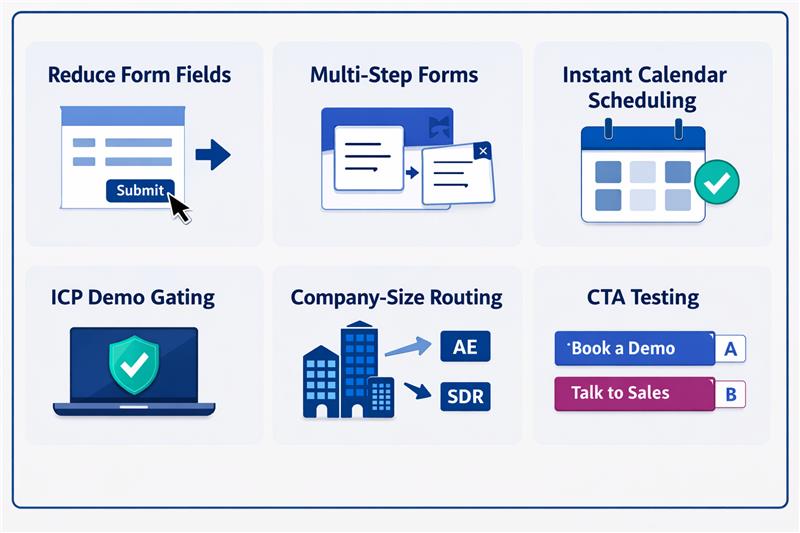
Teams often identify friction in demo request flows but hesitate to experiment because these forms sit on top of critical sales infrastructure. Even small UI changes can affect routing rules, territory ownership, or scheduling logic. Many CRO ideas can improve conversions, but if implemented without operational safeguards, they can disrupt CRM workflows and sales execution.
| Experiment | What changes | Conversion upside | Operational risk |
| Reduce form fields | Remove fields like company size or industry | Lower friction, higher submissions | Routing rules lose required inputs |
| Multi-step forms | Break long forms into steps | Higher completion rates | Partial data can break routing or CRM mapping |
| Instant calendar scheduling | Show rep calendars immediately | Faster meeting booking | Wrong routing exposes incorrect calendars |
| ICP demo gating | Allow scheduling only for qualified leads | Higher lead quality for sales | Qualification logic can conflict with routing |
| Company-size routing | Route enterprise leads to AEs | Faster sales response | Incorrect data misroutes territories |
| CTA testing | “Book a demo” vs “Talk to sales” | Higher click and submit rates | Intent signals may disrupt qualification workflows |
Read more: RAG vs Fine-Tuning: Cost, Compliance, and Scalability Explained
Demo request flows should be treated as sales infrastructure. The safest way to experiment is to separate the experimentation layer from the operational layer that controls routing, territories, calendars, and CRM workflows. When these layers remain independent, teams can test improvements without disrupting sales execution.
Preserve required routing inputs
Routing systems depend on structured data fields to determine ownership, territory assignment, and follow-up workflows. Experiments should never remove or corrupt the inputs these systems require.
- Keep core routing fields such as geography, company size, industry, and account ownership intact.
- Ensure routing inputs continue to populate even if the visible form layout changes
- Maintain consistent field mapping between the form and CRM records.
- Avoid experiments that remove required routing data without replacement.
- Validate that routing logic still receives the expected data format after experimentation.
Use enrichment instead of extra form fields
Reducing form friction is a common experiment, but routing systems still require company-level data. Enrichment allows teams to shorten forms while preserving operational inputs.
- Capture minimal user input and enrich missing data using company intelligence tools.
- Automatically populate firmographic attributes such as company size, industry, and revenue.
- Ensure enrichment runs before routing rules are executed.
- Use enrichment to replace fields removed during form optimisation experiments.
- Validate enriched data accuracy to avoid misrouting leads.
Run experiments within controlled segments
Running experiments across all traffic increases operational risk. Limiting tests to defined segments helps isolate potential failures without affecting the entire pipeline.
- Restrict experiments to specific traffic sources or campaign segments.
- Avoid running early tests on enterprise territories or key accounts.
- Segment experiments by geography where routing rules are simpler.
- Use controlled rollouts before scaling experiments globally.
- Monitor segment-level performance before expanding the test.
Build routing safeguards before running tests
Operational safeguards ensure leads continue to reach sales teams even if an experiment fails or routing logic behaves unexpectedly.
- Create fallback routing rules that assign leads to a default queue when conditions fail.
- Implement calendar load balancing to avoid SDR scheduling overload.
- Maintain default assignment logic for incomplete lead data.
- Monitor routing failures through automated alerts and logs.
- Ensure experiments cannot bypass mandatory sales assignment workflows.
Monitor operational metrics
Demo flow experiments should not be judged solely on form conversion performance. Operational stability and sales efficiency must also be monitored.
- Track routing accuracy to confirm leads reach the correct representatives.
- Monitor meeting booking success rates across experiments.
- Measure SDR calendar utilisation to detect scheduling overload.
- Validate CRM data integrity and lead record consistency.
- Evaluate pipeline attribution to ensure marketing and sales reporting remain accurate.
Read more: Executive Guide to Measuring AI ROI and Payback Periods
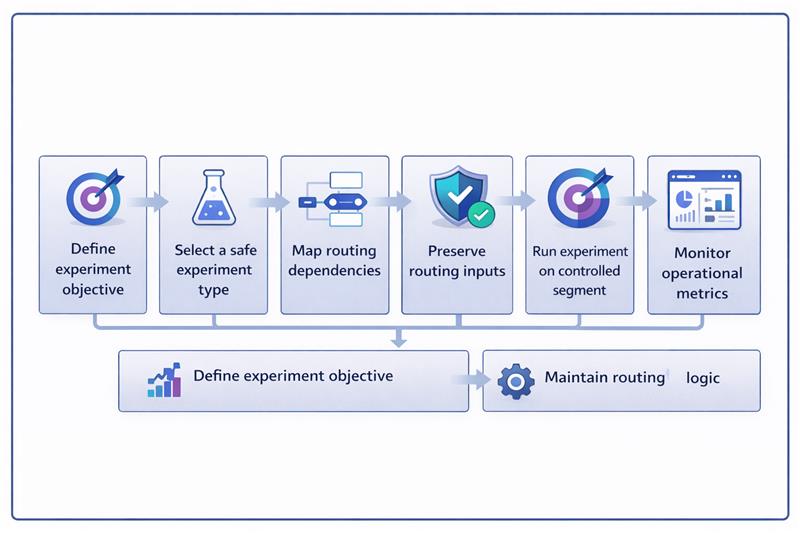
Running experiments on demo request flows requires a controlled workflow. The experiment should modify the user experience while keeping the routing, CRM mapping, and calendar systems unchanged.
The example below shows how a team tests a multi-step demo form while preserving routing inputs through enrichment and keeping backend assignment logic intact.
- Define the experiment objective: Identify the specific friction point in the demo form, such as long forms, reducing completion rates.
- Select a safe experiment type: Choose a UI-level test like converting a single long form into a multi-step form.
- Map all routing dependencies: List the fields required for routing, territory assignment, SDR ownership, and CRM mapping.
- Preserve routing inputs: Ensure required fields such as geography, company size, and industry still reach the routing engine.
- Capture minimal visible inputs: Reduce visible form fields while keeping only essential user inputs on the form.
- Apply enrichment for missing data: Use enrichment tools to populate company-level attributes removed from the form.
- Validate data before routing executes: Confirm that enrichment fills required fields before routing rules are triggered.
- Maintain existing routing logic: Ensure the experiment does not modify territory rules or lead assignment workflows.
- Keep calendar assignment unchanged: Continue using the existing SDR or AE calendar scheduling rules.
- Run the experiment on a controlled segment: Limit the test to a defined traffic group before expanding to all users.
- Monitor operational health: Track routing accuracy, meeting bookings, CRM record creation, and calendar utilisation.
- Evaluate experiment impact: Compare conversion rates and operational metrics before deciding whether to scale the change.
Read more: Why Enterprise AI Fails and How to Fix It
Demo request flows are deeply integrated with sales infrastructure. Routing engines, territory ownership rules, CRM workflows, and SDR calendars all depend on the data these forms generate. This is why many teams avoid experimentation altogether. The real challenge is how to experiment without disrupting the systems that turn demo requests into a pipeline.
When experimentation is separated from routing logic, teams can safely optimise these high-intent conversion points. Preserving routing inputs, using enrichment, running controlled experiments, and monitoring operational metrics allow improvements without operational risk. If your team wants to improve demo conversion without breaking sales systems, Linearloop helps design experimentation frameworks that protect routing logic while enabling continuous optimisation.

Mayur Patel, Head of Delivery at Linearloop, drives seamless project execution with a strong focus on quality, collaboration, and client outcomes. With deep experience in delivery management and operational excellence, he ensures every engagement runs smoothly and creates lasting value for customers.
Related Posts

Why Enterprise CMS Migrations Fail Before They Begin
According to the 2025 CloudBees DevOps Migration Index, 77% of enterprise migration projects exceeded budget by more than 10%. Only one in four organisations said their migration delivered expected value within a year.
Those numbers are not an argument against migration. They are an argument for approaching it differently.
The move toward enterprise headless CMS architecture is accelerating. Forrester's Q1 2025 Wave found enterprise buyers now split roughly evenly between headless and template-based delivery. The market is not debating whether to move. It is debating how to move without the 77% outcome.
This piece addresses that question directly.
The trigger is rarely a single failure. It is accumulated operational debt.
Marketing teams raise tickets to change a headline. Engineering backlogs fill with content requests that have nothing to do with engineering. A mobile application launches and someone discovers the CMS cannot feed it. A regional team needs its own content environment and the only answer is a separate installation with separate governance and separate costs.
At some point the cost of staying on the legacy platform exceeds the cost and disruption of leaving it. That is the inflection point, and increasingly organisations are reaching it faster than they expected. The gap between what traditional enterprise CMS platforms were designed for and what modern digital operations require has widened every year.
The structural problem is this: legacy systems couple content creation, presentation logic, and delivery into a single layer. Every new channel, every new market, every new front-end framework becomes a negotiation with that coupling. The organisation adapts to the platform instead of the platform serving the organisation.
Enterprise headless CMS decouples the content management layer from the delivery layer. The CMS stores, structures, and governs content. The front end, whether a website built in Next.js, a mobile application, a retail kiosk, or an AI assistant, retrieves that content via API and renders it in context.
The operational implication is significant. A single piece of content can be authored once and delivered simultaneously across every channel without duplication, without version drift, and without a separate team managing each touchpoint.
The tension that pure headless CMS introduced was editorial experience. Developers gained API flexibility. Marketing teams lost the ability to see what they were creating in context. Every preview required a developer. Every layout change required engineering input.
Visual headless CMS resolves this tension. It preserves the structured, API-first content model while returning a live editing interface to content teams. Editors see how the page renders before publishing. Developers retain the architectural freedom they need. This is the balance most compliance-led enterprises actually need to operate at scale, and it is the architecture that platforms like dotCMS are built around.
Also Read: Enterprise Headless CMS: What to Assess Before You Shortlist a Platform
Migration projects that struggle almost always share one characteristic: they are treated as technical projects rather than organisational ones. Platform selection matters. Implementation approach matters more. Organisational readiness determines both.
There are four points where migrations consistently break down.
Content architecture underestimated
Legacy CMS platforms store content as pages, a URL, a template, a body of HTML. Headless CMS stores content as structured objects: discrete fields, typed attributes, defined relationships. Before a single piece of content moves, it needs to be remodelled.
Most organisations discover that 30 to 40% of their existing content is redundant, outdated, or structurally inconsistent during a comprehensive audit. A site with several hundred pages often contains thousands of content fragments when examined properly. Building this rationalisation into the project plan is not pessimism. It is accuracy.
Governance undefined before go-live
In legacy CMS environments, governance is often informal, a set of conventions that evolved over years rather than a designed system. A structured enterprise headless CMS platform forces this to be explicit. Workflows, approval chains, user roles, and publishing permissions need to be architected before launch, not discovered after it.
For compliance-led enterprises in financial services, healthcare, or regulated manufacturing, this is not a configuration task. It is a content operations design exercise. Treating it as anything less is the fastest route to a post-launch governance failure.
Integration dependencies mapped late
Legacy enterprise CMS platforms accumulate integrations over time: analytics, personalisation, search, CRM, digital asset management, e-commerce. Each integration needs to be assessed against the new API-first architecture. Some connect cleanly. Some need to be rebuilt. Some need to be replaced.
Mapping these dependencies at the start of the project, not during development, prevents the scope expansion that derails timelines and inflates budgets.
Team readiness treated as an afterthought
The migration is not complete when the platform is live. It is complete when the teams using it can operate independently and confidently. Training, documentation, and a supported transition period are not optional extras in an enterprise context. They are delivery components.
Enterprise headless CMS adoption fails most visibly at this point, not because the platform is wrong but because the organisation was not prepared to use it.
Also Read: Headless vs Hybrid vs “Universal” CMS: Which Model Fits Multi-Team Delivery?
The organisations that manage CMS migrations most effectively treat them as structured transitions rather than cut-overs.
Phase the migration, do not cut over. Running the legacy platform and the new platform in parallel for a defined period, starting with lower-risk content areas and migrating progressively, reduces delivery risk and gives teams time to develop operational competency before the full switch.
Define the content model before selecting the front end. The content architecture decision shapes editorial workflows for years. Front-end framework choices are reversible in a headless architecture. Content model decisions are significantly less so.
Invest in the front-end layer. A decoupled architecture requires a capable front end. If the organisation's engineering team is not experienced with the frameworks commonly used in headless implementations, that capability either needs to be built or sourced from an implementation partner with direct experience in enterprise headless CMS delivery.
Validate governance in staging. Approval workflows, role-based permissions, and audit logging need to be tested against realistic editorial scenarios before go-live, not after the compliance team reviews the first published page.
The case for moving to an enterprise headless CMS is not made in the platform. It is made in what the platform unlocks.
Marketing teams that no longer wait on engineering publish faster, localise faster, and test faster. Engineering teams freed from content maintenance focus on product development. Governance teams operating within a structured, auditable workflow environment have cleaner records and fewer compliance incidents.
Organisations running multi-site management from a single governed environment, rather than maintaining separate CMS installations for each brand, region, or microsite, begin to see content infrastructure as a commercial asset rather than a maintenance cost.
Prominent businesses that have moved to headless architecture report 65% faster time to market for new digital channels and touchpoints. The gap between organisations that have made this shift and those still managing monolithic enterprise CMS platforms will widen as omnichannel delivery, AI content integration, and multi-region operations become baseline expectations rather than competitive advantages.
The choice of implementation partner shapes the migration outcome as much as the choice of enterprise CMS platform.
A capable partner brings three things beyond technical execution: a methodology for content architecture grounded in how the organisation actually operates, experience navigating the governance and integration questions that arise in enterprise environments, and the ability to work across the boundary between marketing and engineering without losing either team in the process.
Platform expertise is necessary. Understanding what the platform is being asked to do, and for whom, is what separates a successful enterprise headless CMS migration from one that joins the 77%.
Linearloop is a dotCMS implementation partner specialising in AI-led product engineering and digital transformation. If your organisation is evaluating a CMS migration or modernising existing content infrastructure, reach out to begin the conversation.

Mayank Patel
Jul 10, 20265 min read

Enterprise Headless CMS: What to Assess Before You Shortlist a Platform
An enterprise headless CMS separates content storage from the front end that displays it, delivering content through an API so the same content can power a website, a mobile app, or any other channel independently. Choosing the right one depends on three things: how many channels your content actually needs to reach; how much front-end engineering capacity your team can commit long-term; and how complex your governance requirements are across regions or business units.
Most vendor conversations start with a feature list. That is the wrong entry point, because features do not tell you whether your organisation can actually sustain the platform once it is live. This guide covers the evaluation framework we walk enterprise teams through before any shortlist gets built, the structural comparison between platform models, and the decision logic that follows from it.
Also Read: Why Some Lead Form Fields Kill Conversions (And Which Ones Actually Help)
An enterprise CMS is a content management system built to handle the volume, governance, security and integration complexity that a single site or small business CMS is not designed for. Multiple brands, regions, approval chains and content types are the norm, not the exception. Whether that enterprise CMS should be headless, hybrid or traditional is a separate decision, and it is the one this guide answers.
Headless CMS means separating content storage from the front end that displays it, so the same content reaches a website, an app or any other channel through an API instead of a built-in template. A traditional CMS renders the page itself. A headless CMS hands content to whatever system asks for it, and that system decides how to display it.
A hybrid CMS, where platforms like dotCMS sit, keeps that API-first content layer but adds an optional front end and visual editing tools on top so marketing teams are not left waiting on engineering for every page change.
The distinction changes who owns the decision. A traditional CMS choice is largely a marketing and content operations call. A headless CMS choice is an architecture decision with marketing consequences, and it needs both functions in the room from day one.
Also Read: B2B Marketplace Logistics Workflow (End-to-End Workflow)
If the honest answer is one website, the case for headless is weaker than any headless platform's sales page will admit. Headless earns its complexity when content genuinely needs to reach multiple surfaces.
Enterprise content rarely takes one shape. A product page, a regulatory disclosure and a campaign landing page each need different fields, relationships and governance. Evaluate a platform's content modelling against your actual content types, not the demo's blog post example.
Response times, caching behaviour and rate limits under real traffic are where headless platforms diverge most from their marketing claims. Ask for load tested numbers on content structures similar to yours, not published benchmarks on a blank content model.
This is the most common regret in headless migrations. Pure API-first platforms can leave marketing teams dependent on engineering for changes that used to take five minutes. A hybrid layer or a well-built preview and editing experience is not a nice to have at enterprise scale. It is the difference between adoption and a shelved project.
Role-based permissions, approval workflows and localisation need to be assessed against your actual organisational structure, including the parts of it that are politically inconvenient to model. A platform that assumes one content team, one brand and one approval chain will not survive contact with a matrixed enterprise.
Content rarely lives alone. If product data, digital asset management or personalisation engines are already in place, the CMS has to integrate cleanly with them, not force a rebuild of adjacent systems that already work.
Vendor lock-in in headless CMS is quieter than in traditional platforms. It shows up in proprietary query languages, custom field types with no export path, and content models that only make sense inside one vendor's schema. Ask this before signing, not during the exit.
Implementation, custom front-end development, ongoing engineering support and migration efforts usually outweigh licensing costs over three years. A cheaper licence with a heavier build is not automatically the cheaper decision. Model the fully loaded cost across a three-year horizon before comparing quotes.
Also Read: Building a B2B Marketplace: Complete Blueprint for Scale, Trust, and Liquidity
The category splits into three architectural models, not a single spectrum of "more or less headless". Understanding which model a platform belongs to tells you more than any feature checklist.
Model | Representative Platforms | Strongest For | Weakest For |
Traditional monolithic | Adobe Experience Manager (legacy mode), WordPress (default) | Single-channel sites needing fast launch and minimal engineering overhead | Multi-channel delivery, API-first integrations, scaling past one front end |
Pure headless | Contentful, Sanity | Maximum channel flexibility, engineering-led teams building custom front ends | Editorial independence, out-of-the-box governance, teams without dedicated front-end resources |
Hybrid | dotCMS, Storyblok | Balancing API-first architecture with a working front end and visual editing | Teams needing extreme customisation beyond what the hybrid layer exposes |
The comparison that matters is not which platform has more features. It is which architectural model matches your organisation's actual engineering capacity and channel ambition. A pure headless platform in the hands of a marketing-led team with no dedicated front-end engineers will underperform a hybrid platform on time to value, regardless of API quality.
Within the hybrid category, dotCMS's position is specific. Content architecture is API-first from the ground up, but the platform ships with enough front-end and visual editing capability that marketing teams retain publishing independence. That trade-off is why it tends to fit enterprise teams that want headless-grade flexibility without building and maintaining a bespoke front end and editorial layer from scratch. You can see how this plays out in practice on our dotCMS partnership page.
Rather than scoring platforms feature by feature, work through this sequence.
If no, a traditional CMS is likely the correct answer, and the rest of this framework is premature. If yes, proceed.
If yes, a pure headless platform becomes viable, and API architecture and content modelling flexibility should carry the most weight in your evaluation. If no, proceed to hybrid platforms and weight editorial independence more heavily than raw API flexibility.
If governance is simple, most hybrid and headless platforms will satisfy it. If governance is complex, this becomes a disqualifying filter before cost or features are even discussed. Request a governance model walkthrough against your actual org chart before any commercial conversation.
Heavy integration load favours platforms with mature, documented APIs and existing connectors to your specific stack over platforms with broader but shallower integration claims.
Before signing, confirm content export format, whether custom field types are portable, and what a migration off the platform would realistically require. This is the question every vendor conversation skips and the one every failed migration wishes had been asked earlier.
The trade-off underneath all five steps is the same one: flexibility against build effort. A pure headless platform maximises flexibility and asks the most of your engineering team. A traditional platform minimises build effort and caps your channel ceiling. A hybrid platform trades a slice of flexibility for a working editorial layer, which is usually the correct trade for enterprise teams that need to move on content without a permanent squad dedicated to CMS infrastructure.
Also Read: How B2B Marketplaces Can Attract, Qualify, and Convert High-Value Buyers
Most enterprise buyers researching this topic are not starting from zero. They are running an existing CMS and deciding whether, and how, to move. The migration follows a predictable lifecycle, and where it breaks down is consistent across projects.
Catalogue existing content types, volume, and every system currently integrated with the CMS, including the undocumented ones. Most timelines go wrong here, because the audit is treated as a formality rather than the foundation for everything after it.
Rebuild the content architecture for the target platform before touching migration tooling. A content model copied directly from the old system replicates its constraints rather than solving them.
Migrate in stages, keeping the existing front end live wherever possible while the content layer is rebuilt underneath it. A full rebuild that goes live in one cutover carries more risk than the timeline pressure to do it that way usually accounts for.
Train content teams on the new publishing workflow before decommissioning the old system, not after. This is the stage most technical migration plans underwrite, and the one that determines whether the new platform gets adopted or quietly worked around.
A phased migration that keeps a working front end in place while the content architecture is rebuilt underneath it is, in most enterprise contexts, faster to production and materially lower risk than a full rebuild attempted in one pass.
This is the same framework we use as a dotCMS implementation partner when a client is deciding between a full headless rebuild and a phased migration that preserves a working front end while the content architecture is rebuilt underneath it. The right answer has depended less on the platform's feature list and more on how much appetite the organisation has for owning a custom front end and how urgently new channels need to ship.
The teams that get the most value from a headless or hybrid migration are the ones that work through the eight questions and the decision tree honestly before they see a single demo, because a demo will always look capable. The gap between a demo and a production system at enterprise scale is exactly where these questions live.
If your team is weighing a headless or hybrid CMS migration and the framework above raises more uncertainty than clarity, that is normal at this stage. Our team can walk through your specific content architecture and integration landscape on a call and help you work out where you actually sit on the flexibility versus build effort trade-off before you shortlist vendors.
Mayank Patel
Jul 6, 20265 min read